Odoo POS: Point of Sale System for Restaurants and Retail Stores
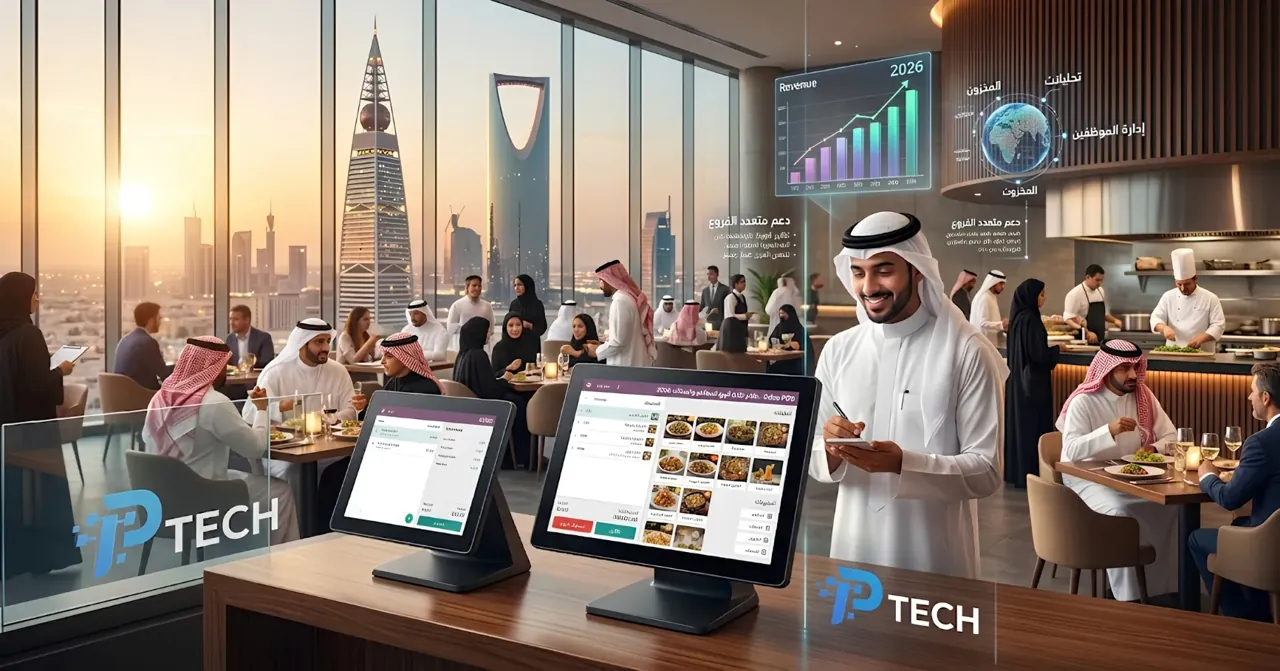
Quick answer: Odoo POS is a point of sale (cashier) system that runs directly in the browser on any device, whether a tablet, laptop, or touchscreen, with two main modes: restaurant mode (table management, kitchen display, bill splitting) and retail mode (barcodes, inventory, customer loyalty). Its core advantage is that every sale updates inventory and accounting automatically at the same moment, and the system keeps working even when the internet goes down, with official support for Saudi simplified e-invoicing once the correct localization is configured.
Two Operating Modes: Restaurant and Retail
Odoo POS offers a different configuration depending on the nature of your business, and you can run multiple points of sale with different settings at the same time within the same company (for example, one point of sale for a restaurant and another for its gift shop). When setting up any new point of sale, you choose either "Restaurant" or "Retail" mode in Odoo, which automatically determines the available features.
Restaurant Features: From Table to Kitchen
Table Management and Visual Floor Plan
You can create a floor plan that matches your restaurant's actual layout, divided into sections (main dining room, terrace, bar), with the capacity of each table defined. Table colors change automatically based on their status (available, occupied, reserved), giving the service team an instant overview without having to walk between tables to check.
Kitchen Display System
As soon as an order is confirmed at the table, it is automatically sent to the kitchen display or to the kitchen and bar printers, split by product category (drinks to the bar, main dishes to the kitchen). Courses can also be sent in separate rounds (appetizers, then main dishes) instead of sending the whole order at once, and special notes (food allergies, customer preferences) can be added and shown directly to the relevant staff.
Bill Splitting and Flexible Payment
A single table's bill can be split by seat, by item, or by custom percentages, and the check can be closed within seconds even for large groups, a critical practical feature during peak hours.
QR Code Self-Ordering and Self-Service Kiosks
Customers can scan a QR code on the table to view the menu, order food directly from their own devices, and even pay online afterward, or use a standalone self-service kiosk to order and pay without staff involvement.
Table Reservations and Combo Meals
Direct integration with the Appointments app displays reserved tables on the floor plan automatically, along with the ability to easily set up combo meals as a single sales option instead of assembling them manually in every order.
Offline Mode
One of the most important practical features of Odoo POS: the system keeps working completely normally when the internet goes down. All sales are recorded locally on the device and then synchronized automatically with the central server as soon as the connection is restored, without losing any sale or requiring manual re-entry. This feature is critical for any business that cannot afford a cashier outage during peak hours because of a temporary connection issue.
Supported Hardware
Odoo POS integrates with most common point of sale equipment in two ways:
IoT Box (a dedicated Raspberry Pi device): connects printers, barcode scanners, cash drawers, and scales to the system without additional technical complexity.
Direct browser connection (Web USB): for devices connected directly via USB, on browsers that support this feature (Chromium-based browsers).
Supported hardware includes receipt printers and kitchen printers, barcode scanners, cash drawers, customer displays, and multiple electronic payment processors (Stripe, Adyen, Worldline, and others).
Automatic Integration with Inventory and Accounting
This is the real core value of Odoo POS compared to standalone cashier systems: every sale updates inventory instantly based on the product recipe (Bill of Materials) in the case of restaurants, while sales, taxes, and payments are posted directly to the accounting books without any manual reconciliation between the cashier and accounting at the end of the day. This means restaurant owners can track actual ingredient consumption against theoretical inventory and monitor food cost accurately, instead of relying on cash sales figures alone.
Compliance with Saudi E-Invoicing (ZATCA) at the Point of Sale
This section is extremely important for any Saudi restaurant or retail store. Point of sale transactions are mostly business-to-consumer (B2C) transactions, which legally means issuing a simplified tax invoice that includes a QR code printed directly on the customer's receipt, with the transaction data submitted to the "Fatoora" platform in Reporting mode rather than the Clearance mode used for business-to-business (B2B) invoices.
When the official Saudi localization is properly configured in the Enterprise edition, Odoo automatically generates a compliant QR code on every receipt without any additional custom development, and the report is submitted to the Fatoora platform automatically. An important point that should reassure restaurant owners in particular: even if an invoice is issued while the internet connection is down (thanks to offline mode), it is automatically submitted to the platform as soon as the connection is restored, with no acceptance issues, as long as it is reported once the network is back.
A reminder of the same important warning from previous articles: it is always recommended to test this integration through the simulation environment (Fatoora Simulation Portal) before activating it in the live environment, because switching to Production mode is an irreversible action.
Loyalty Programs and Repeat Customers
Customer details (email address, mobile number) can be recorded directly from the cashier screen to build a loyalty program with points or cumulative discounts, and each customer's purchase history can be tracked individually. It is a simple but effective marketing tool for encouraging repeat visits without needing a marketing tool separate from the sales system itself.
Who Uses Odoo POS?
Restaurants, cafes, and bars: thanks to table management, the kitchen display, and bill splitting.
Retail stores and multi-branch chains: thanks to barcodes, multi-location support, and direct integration with inventory.
Temporary events and kiosks (pop-ups): thanks to easy setup on any device and the ability to work without a constant internet connection.
Any business in Saudi Arabia that sells directly to end consumers and needs reliable compliance with simplified tax invoice requirements without building a custom solution from scratch.
How to Get Started with Odoo POS
Activate the Point of Sale app and choose the appropriate mode (restaurant or retail) for each point of sale you manage.
Set up the visual table floor plan if you run a restaurant, or product categories and barcodes if you are in retail.
Connect your hardware (printers, scanners, cash drawers) via an IoT Box or a direct connection.
Activate the Saudi localization and make sure the correct QR code appears on receipts before going live, testing it first in the simulation environment.
Train your service team on offline mode so they know the system will keep working normally even if the internet drops momentarily at the busiest times.
Conclusion
Odoo POS is not just a cashier screen; it is a direct connection point between the customer experience and the inventory, accounting, and tax compliance working in the background. Its real value shows precisely when your operational data (sales, food cost, taxes) needs to be connected automatically instead of being compiled manually from separate systems at the end of every day. For Saudi businesses in particular, official support for QR codes and Fatoora reporting makes compliance a natural part of every sale rather than a separate additional burden.
Frequently Asked Questions
Does Odoo POS really work without an internet connection? Yes, the system continues to record all sales locally on the device while the connection is down, then fully synchronizes them automatically as soon as the network is back, without losing any data.
Does Odoo POS support the QR code required in Saudi Arabia? Yes, as part of the official Saudi localization in the Enterprise edition, a QR code compliant with simplified tax invoice requirements is added automatically to every receipt without additional custom development.
Can Odoo POS be used for a restaurant with a kitchen display covering more than one section (such as a kitchen and a bar)? Yes, you can create multiple displays or printers dedicated to each section, so drink items are routed to the bar and food items to the kitchen automatically based on product category.
Does running Odoo POS require expensive specialized hardware? No, it runs in a browser on any ordinary tablet, laptop, or touchscreen, with the option to add peripherals (printers, scanners) when needed through a simple IoT Box.
Are point of sale transactions automatically reflected in inventory and accounting? Yes, this is the core value of the system: every sale updates inventory instantly based on the product recipe, and the accounting and tax entries are posted automatically without any manual reconciliation.